
Updated for 2026
PhilHealth Login 2026 | Access Your Member Portal, MDR & Contributions
Logging in should take under a minute. This guide gives you the exact steps for the Member Portal, employer EPRS and provider login, plus simple fixes for every login error. No jargon. No runaround.
Member Portal Login
Email address or PIN
you@email.com
Password
••••••••
Official login: memberinquiry.philhealth.gov.ph
Logging in to PhilHealth should take under a minute. For most people it does. The trouble starts when you are not sure which portal to open, or the page says your details do not match and you are already late for something.
This guide clears that up. There are three PhilHealth logins, not one. Members use the Member Portal. Employers use EPRS. Hospitals and clinics use the IHCP portal. Below you get the exact steps for each, how to reach your MDR and contributions once you are in, and simple fixes for every login error that usually sends people to a branch. No jargon. No runaround.
To log in to PhilHealth, go to the Member Portal at memberinquiry.philhealth.gov.ph, enter your registered email or PhilHealth Identification Number (PIN) and your password, complete the captcha, and click Login. Employers log in separately through EPRS at eprs.philhealth.gov.ph using their Employer PhilHealth Number (PEN).
PhilHealth Login Portals at a Glance
Before you type anything, make sure you are on the right page. Using the wrong portal is the single most common reason a PhilHealth login “fails.”
| Login type | Who it is for | Where you log in | What you sign in with |
|---|---|---|---|
| Member Portal | Individual members | memberinquiry.philhealth.gov.ph | Email or PIN + password |
| EPRS | Employers and HR | eprs.philhealth.gov.ph | Employer number (PEN) + password |
| IHCP Portal | Hospitals and clinics | philhealth.gov.ph provider services | Accreditation credentials |
If you are a regular member checking your record, printing your MDR, or looking at contributions, you want the Member Portal. Everything in the next section is about that one.
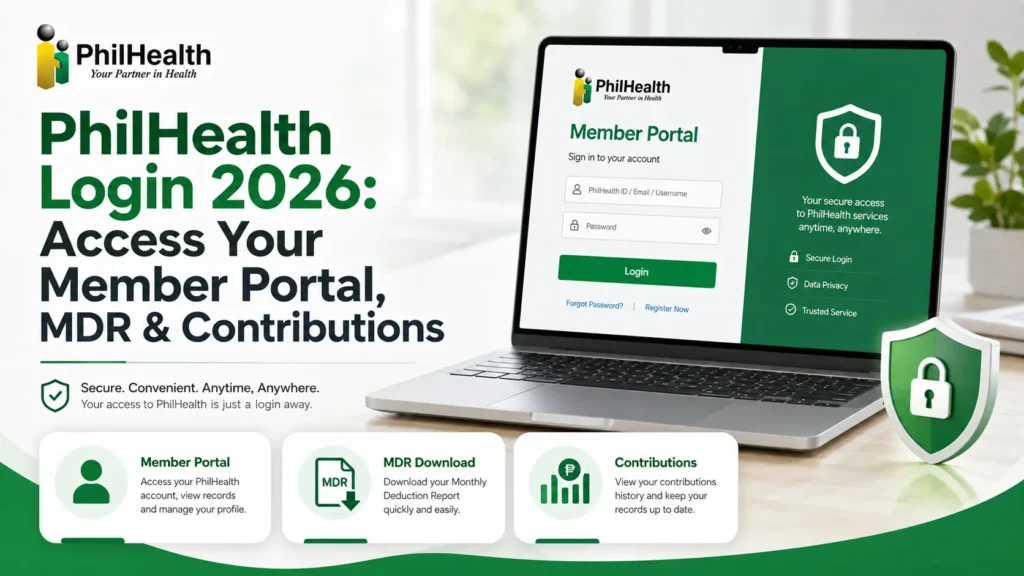
How to Log In to the PhilHealth Member Portal (Step by Step)
The PhilHealth Member Portal, sometimes searched as “my philhealth portal,” is your personal account. It is where you confirm your PhilHealth number, view and print your Member Data Record, and check whether your contributions posted. Here is exactly how to get in.
What You Need Before You Log In
Two things, and that is it.
If you have never made an account, skip to the account creation section below first, because the login page cannot let you in until an account exists.
PhilHealth Member Login Steps
- Open memberinquiry.philhealth.gov.ph in any browser. Type it in yourself or use a bookmark rather than clicking an ad.
- Enter your registered email address or PIN in the first field.
- Enter your password. It is case-sensitive, so watch your caps lock.
- Complete the captcha so the system knows you are human.
- Click Login.
Your dashboard opens within seconds, showing your name, your PIN, your membership category and your current status. From here you reach everything else.
What You Can Do Inside the Member Portal
Once you are logged in, the PhilHealth online services available to you include:
Two of these, the MDR and the contribution check, are the reasons most people log in at all, so they each get their own section below.
First Time Here? How to Create a PhilHealth Online Account
If the login page keeps rejecting you and you have never registered online, you do not have an account yet. Creating one takes a few minutes.
- Go to the electronic registration system at eregister.philhealth.gov.ph.
- Accept the data privacy terms.
- Fill in the PhilHealth Member Registration Form (PMRF) with your details.
- Submit, then open the verification link PhilHealth emails you.
- Set your password. That email and password are now your login.
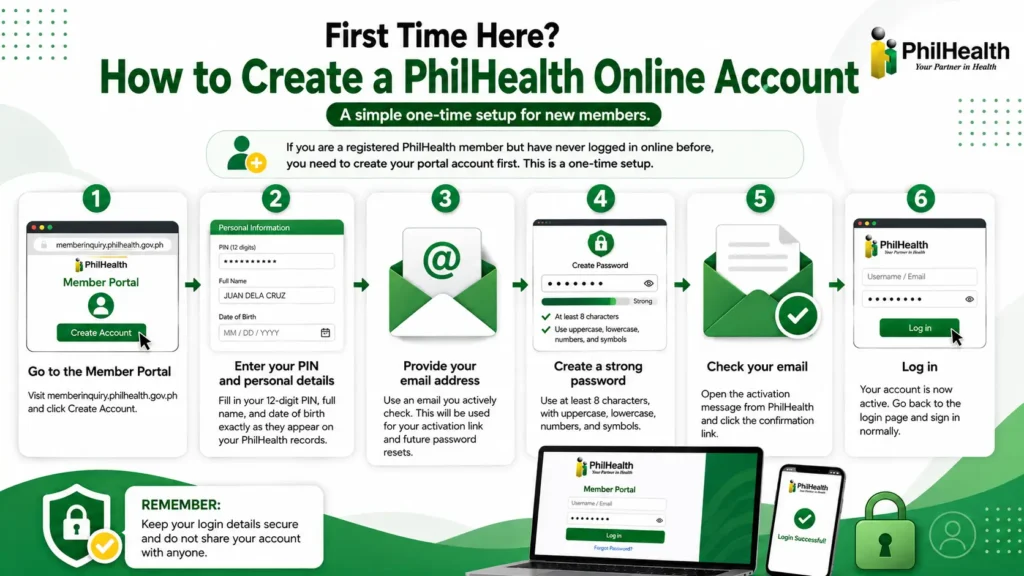
Already have a PhilHealth number from an old employer but no online account? You can still register for portal access using that same PIN, so you do not lose your contribution history. For the complete walkthrough, see our full PhilHealth online registration guide.
How to Access and Download Your MDR After Logging In
Your Member Data Record is the document hospitals, employers and offices ask for as proof of membership. You do not request it or wait for it. Once you are logged in, it is already there.
Steps to View, Save and Print Your MDR
- Log in at memberinquiry.philhealth.gov.ph.
- Find Member Data Record or MDR in your dashboard menu.
- Your record loads on screen with your PIN, personal details and dependants.
- Read every line. Check your name spelling, birth date and the list of dependants.
- To keep a copy, press Ctrl+P on Windows or Cmd+P on Mac, then choose Save as PDF, or send it to a printer.
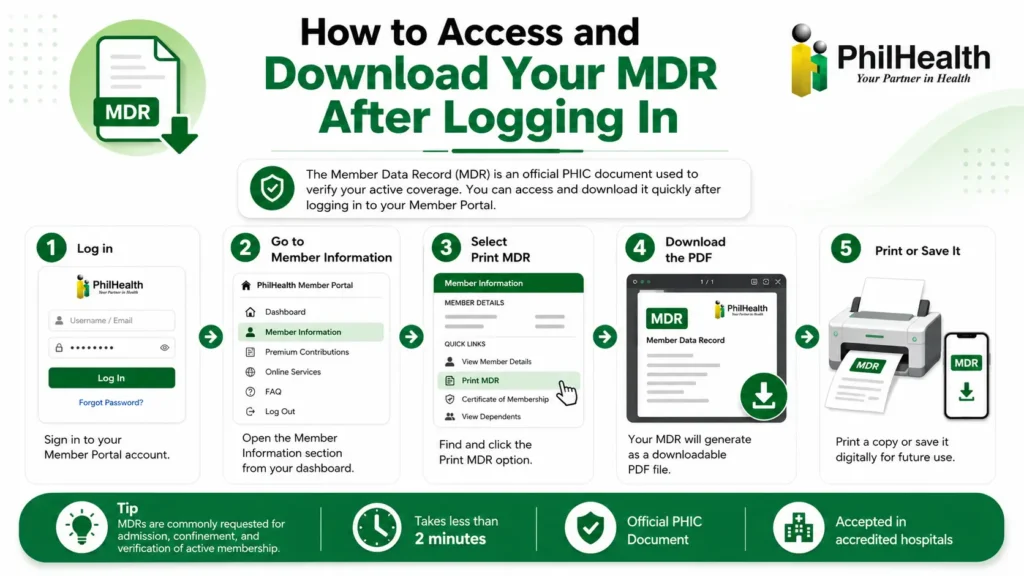
That review step matters. A hospital applies your benefit from this record. If a dependant is missing, their confinement is not covered under your membership, and nobody wants to learn that at discharge. For a deeper walkthrough, see our full MDR guide.
How to Check Your PhilHealth Contribution After Login
Logging in is also how you confirm your premiums actually reached PhilHealth. Do not assume they did just because they were deducted.
- Log in to the Member Portal.
- Open the premium or contribution section.
- Review your posted contributions by month, with the amount and source.
Posting is not instant. Employer remittances usually take a few weeks to show, and payments through banks or e-wallets can lag further. If a contribution is still missing after about a month, follow it up with your employer’s HR or PhilHealth, with your receipt or reference number in hand. To see the current rates, check our 2026 PhilHealth contribution table.
PhilHealth Employer Login: How to Access EPRS in 2026
Employers do not use the Member Portal. They use the Electronic Premium Remittance System, or EPRS, a completely separate login. If you are an HR officer trying to sign in with a member email and getting nowhere, this is why.
What You Need for Employer Login
Your company registers for a PEN once. After that, HR manages everything through EPRS.
EPRS Login Steps
- Go to eprs.philhealth.gov.ph.
- Enter your Employer PhilHealth Number (PEN).
- Enter your password.
- Click Login to open the employer dashboard.
What Employers Can Do in EPRS
If your EPRS access is locked or the account was set up by someone who left the company, PhilHealth handles employer account recovery through its Employer department, not the member hotline.
IHCP Portal Login: For Hospitals and Healthcare Providers
The third login is for accredited institutional health care providers, mostly hospitals and clinics. They access the IHCP portal through the provider services area of philhealth.gov.ph using their accreditation credentials, to verify member eligibility and file claims. If you are an ordinary member, this portal is not for you, and there is nothing here you need to sign in to.
PhilHealth Login for OFWs: Managing Your Account from Abroad
Overseas Filipino Workers use the same Member Portal as everyone else. Your PIN and login work from any country, so you can check your record, print your MDR, and confirm contributions without flying home. A few things to keep in mind from abroad:
Your membership does not lapse just because you are working abroad, but your record only stays useful if the contributions keep posting, so log in every few months and check.
Can’t Log In? Common PhilHealth Login Problems and How to Fix Them
Most login failures have a simple fix. Work through this before you give up and travel to a branch.
| Problem | Likely cause | Fix |
|---|---|---|
| Wrong email or password | Typo, caps lock, old password | Retype slowly, then reset the password |
| Account does not exist | Never finished registration | Create an account first |
| Details do not match | Spelling differs from PhilHealth records | File a correction, do not re-register |
| Account locked | Too many failed attempts | Wait, then reset your password |
| Page will not load | Portal traffic at month end | Try early morning on a weekday |
How to Reset Your PhilHealth Password
- On the login page, click Forgot Password.
- Enter your registered email address or PIN.
- Open the reset link PhilHealth sends to your email.
- Set a new password, then log in with it.
If the reset email never arrives, check your spam folder first. If your registered mailbox is dead and you cannot receive the link, you will need to update your email at a branch with a valid ID before you can reset online.
Forgot Your PhilHealth Number (PIN)?
Your PIN is permanent, so you never lose it, you just need to find it again. It appears on your MDR, on old payslips from employers who deducted premiums, and on any previous PhilHealth ID. Your HR department also keeps it on file. Searching by name alone is only possible at a branch with a valid ID, because handing out member numbers to anyone who types a name would be a privacy problem.
Account Locked or Not Yet Activated
Two different problems get confused here.
If you registered but never clicked the verification link in the email, your account was never activated. It exists in limbo and the login will keep rejecting you. Find that original email, check spam, and open the link. If it expired, request a new verification email from the login page.
If you triggered a lockout with repeated wrong passwords, the account is temporarily frozen. Give it time rather than hammering the login, then use Forgot Password to reset cleanly. If it stays locked after a full day, call the PhilHealth hotline with your PIN and a valid ID ready, and they can check the account status on their side.
“Your Details Do Not Match” and Captcha Errors
This one is almost always a spelling mismatch between what you typed and what PhilHealth encoded, often a missing middle name or a suffix like Jr. The fix is a record correction, not another registration attempt, because a second registration creates a duplicate that causes bigger problems later. For a stubborn captcha, refresh the page, switch browsers, or clear your cache and try again.
PhilHealth Login on Mobile: Phone Browser and App
You do not need a computer to use PhilHealth. The Member Portal works in the browser on any phone. Open memberinquiry.philhealth.gov.ph in Chrome or Safari, log in the same way you would on a laptop, and the pages adjust to your screen. You can view and save your MDR straight to your phone as a PDF.
A word on apps. As of 2026, the reliable way to reach your account is the official web portal on philhealth.gov.ph, not a downloaded app from an app store. Several third party apps claim to offer PhilHealth login and end up collecting the PIN and password people enter. If an app is not clearly published by PhilHealth itself, do not type your credentials into it. When in doubt, use the browser.
Keeping Your PhilHealth Login Secure
Your PhilHealth account holds your membership number, your personal details and your dependants. It is worth protecting.
How to Spot a Fake PhilHealth Login Page
Phishing pages copy the real portal almost exactly, then rank on search results or arrive in a text message. Before you type anything, check that the address is on the official philhealth.gov.ph domain.
The member login lives at memberinquiry.philhealth.gov.ph and nowhere else. Never enter your PhilHealth PIN or password on any site outside that domain, no matter how official it looks. Reaching the portal from your own bookmark, rather than a link someone sent you, removes most of the risk.
Password and Account Safety Habits
PhilHealth will not call to ask for your password. Anyone who does is not PhilHealth.
How to Update Your Details After Logging In
Logging in is also how you keep your record accurate. Once inside the Member Portal, open your profile to edit the fields the system allows, such as your address and contact number, then submit. Changes that need proof, like a name correction or adding a dependant, are filed with a PMRF and supporting documents.
Adding a newborn or a spouse the moment it happens matters, because a dependant on your record today is covered if they need care next month. For the full process, see our guide to updating PhilHealth information.